

Buying a used iPhone in 2026 can save you hundreds of dollars or thousands of naira, but only if you know what to look for.
With newer iPhone models becoming increasingly expensive, the market for refurbished and pre-owned devices continues to grow. Unfortunately, so do fake iPhones, stolen devices, hidden hardware issues, and sellers looking to make a quick profit.
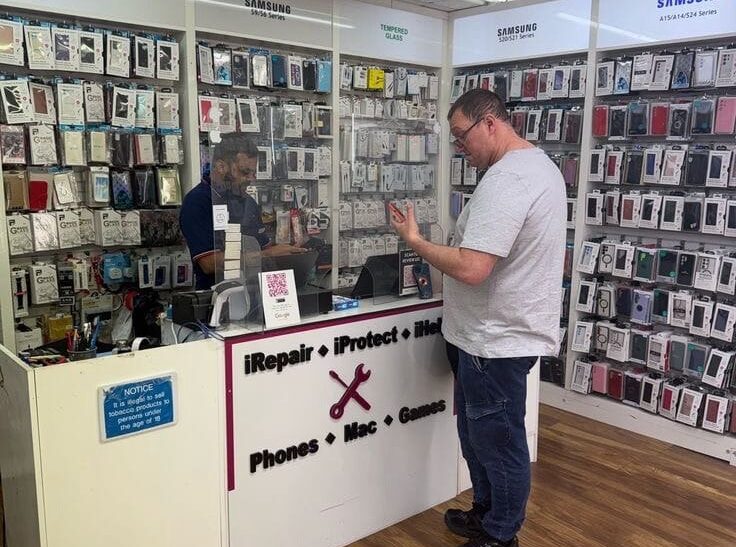
Whether you’re buying from Facebook Marketplace, Jiji, WhatsApp vendors, Instagram stores, or a local phone dealer, taking a few minutes to inspect the phone can prevent costly mistakes.
Here’s everything you should check before handing over your money.
1. Verify the IMEI Number
The IMEI is the unique identity of every smartphone.
Dial:
*#06#
or go to:
Settings → General → About
Compare the IMEI with:
- The SIM tray (on supported models)
- The original box
- The seller’s receipt (if available)
If the numbers don’t match, walk away.
You can also use online IMEI checkers to confirm:
- Activation status
- Model
- Warranty information
- Blacklist status
- Lost or stolen reports
2. Check iCloud Activation Lock
This is one of the biggest mistakes buyers make.
If Activation Lock is enabled, the phone could become completely unusable after a reset.
Go to:
Settings
If the seller asks you not to reset the device, that’s a major red flag.
Before paying:
- Sign out of the previous owner’s Apple ID
- Make sure “Find My iPhone” is turned off
- Factory reset the device
- Complete the initial setup yourself
If it asks for someone else’s Apple ID, don’t buy it.
3. Inspect the Battery Health
Battery replacement can be expensive.
Also Read: Why Your Phone Battery Drains Fast (And How to Fix It in 2026)
Navigate to:
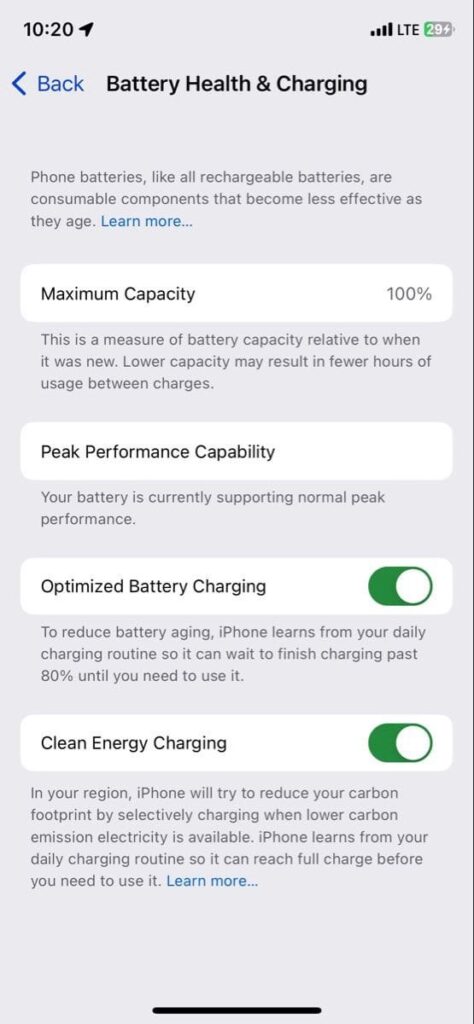
Settings → Battery → Battery Health & Charging
Check the Maximum Capacity.
General guideline:
- 95–100%: Excellent
- 90–94%: Very good
- 85–89%: Acceptable
- Below 85%: Battery replacement may be needed soon
Also ensure the battery shows Normal and not a warning.
4. Examine the Display Carefully
Some used iPhones have cheap aftermarket screens.
Look for:
- Dead pixels
- Screen burn
- Flickering
- Yellow tint
- Green lines
- Poor brightness
- Uneven colors
Test:
- True Tone
- Auto brightness
- Touch responsiveness
- Multi-touch gestures
A genuine display generally offers better color accuracy and responsiveness.
5. Test Face ID or Touch ID
Biometric authentication is expensive to repair.
For Face ID:
Go to:
Settings → Face ID & Passcode
Try setting up Face ID.
If setup fails, there may be hardware damage.
For older iPhones:
Test Touch ID multiple times.
Never assume you’ll “fix it later.”
6. Check All Camera
Open the Camera app and test:
- Front camera
- Rear camera
- Portrait mode
- Video recording
- Flash
- Zoom
- Autofocus
- Night Mode
- Macro mode (supported models)
Watch for:
- Blurry images
- Black spots
- Camera shaking
- Lens fogging
These often indicate previous damage.
7. Inspect the Physical Condition
Look beyond scratches.
Check:
- Charging port
- Speaker grills
- Microphones
- SIM tray
- Side buttons
- Volume buttons
- Mute switch
- Camera lenses
Signs of concern include:
- Bent frame
- Loose screen
- Missing screws
- Glue around the display
- Water damage indicators
These may suggest poor-quality repairs.
8. Confirm All Hardware Works
Spend a few minutes testing everything.
Check:
- Wi-Fi
- Bluetooth
- Mobile network
- Speakers
- Microphone
- Earpiece
- Charging
- Wireless charging (if supported)
- Vibration
- GPS
- Flashlight
Also make a phone call if possible.
Many buyers discover hardware issues only after getting home.
9. Ensure the Phone Isn’t Fake or Modified
Fake iPhones have become increasingly convincing.
Check:
Settings → General → About
Confirm:
- Model number
- Storage capacity
- Serial number
- iOS version
Signs of fake devices include:
- Android interface disguised as iOS
- Google Play Store installed
- Strange animations
- Poor build quality
- Misspelled menus
If anything feels off, don’t buy it.
Read Also: The Best Phone releases of 2025
10. Compare the Price with Market Value
If the deal looks too good to be true, it usually is.
Before buying:
- Compare prices from multiple sellers
- Check refurbished retailers
- Look at current market prices
- Ask why the phone is being sold
Extremely cheap iPhones are often:
- Stolen
- Locked
- Repaired poorly
- Counterfeit
- Damaged internally
Paying a little more for a verified device can save money in the long run.
Bonus Tips
Before finalizing your purchase:
- Meet in a public location.
- Avoid advance payments.
- Request the original receipt if available.
- Ask about previous repairs.
- Check whether all parts are genuine.
- Reset the phone yourself before leaving.
- Test the phone with your own SIM card.
Common Red Flags
Avoid buying if the seller:
- Refuses to let you inspect the phone
- Won’t reset the device
- Can’t explain the phone’s history
- Rushes the transaction
- Insists on cash without testing
- Has mismatched IMEI numbers
- Says Face ID “just stopped working”
Final Thoughts
A used iPhone can be an excellent investment if you know what to inspect. Spending 15 to 20 minutes checking the battery, display, cameras, IMEI, Activation Lock, and overall hardware can help you avoid scams and unexpected repair costs.
With the growing market for second-hand smartphones in 2026, careful inspection is more important than ever. Don’t let a low price tempt you into buying a phone with hidden problems. A few simple checks today can save you significant money and frustration later.
Frequently Asked Questions (FAQs)
Is 85% battery health good for a used iPhone?
Yes, but it’s approaching the point where you may notice shorter battery life. Anything above 90% is generally considered excellent.
How do I know if an iPhone is stolen?
Check the IMEI number using a reputable IMEI checker and ensure Activation Lock is disabled before buying.
Can Face ID be repaired?
Yes, but repairs can be costly, especially if original Apple components are required.
Is buying a refurbished iPhone better than buying from an individual?
Certified refurbished phones usually undergo testing and often come with a warranty, making them a safer option than purchasing from an unknown seller.
Should I buy a used iPhone online?
Yes, but only if the platform offers buyer protection or you can inspect the device before completing the purchase.
Key Takeaways
- Always verify the IMEI number.
- Make sure Activation Lock is disabled.
- Check battery health before buying.
- Test Face ID or Touch ID.
- Inspect the screen, cameras, and hardware.
- Confirm the phone isn’t fake.
- Compare prices before making a decision.
- Never rush into a purchase because of a “cheap” deal.
Similar Read: Buying a Used Phone? Don’t Make These Costly Mistakes